Smart Meter Wiring
The second most common support call: incorrect wiring between the smart meter and inverter. Different Deye models have different configurations — generic diagrams cause errors.
The result: incorrect energy readings, systems that don’t export properly, or meters that fail to communicate with the inverter entirely. These are straightforward to fix once you know the correct pinout — but finding the right diagram in the field has been the problem.
3.6 kW, 5 kW, 6 kW, 8 kW
5 kW, 6 kW, 8 kW, 10 kW, 12 kW
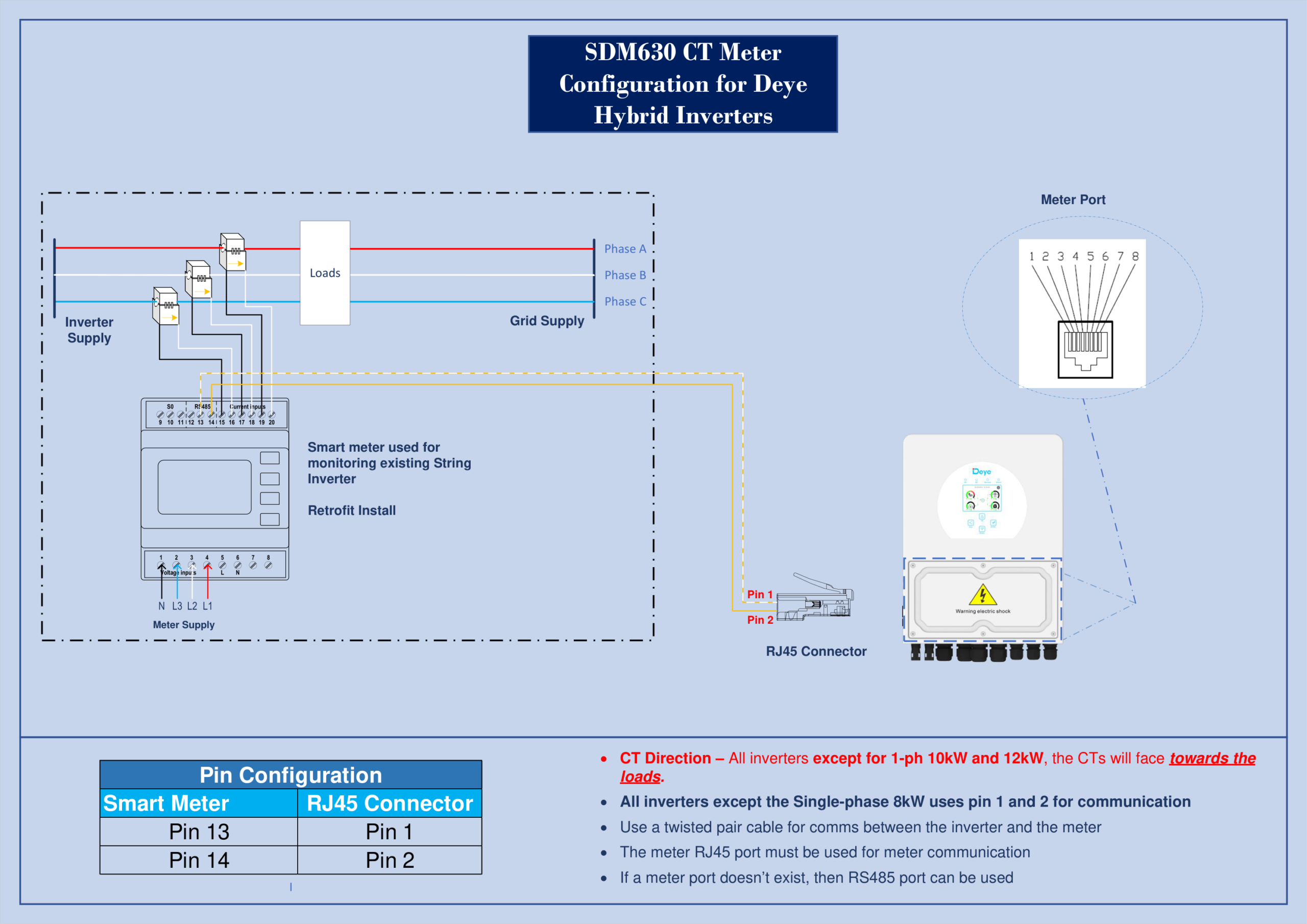
-
CT Direction — All inverters except 1-ph 10 kW and 12 kW: CTs face toward the loads
-
Pin Config — Smart Meter Pin 13 → RJ45 Pin 1, Smart Meter Pin 14 → RJ45 Pin 2
-
All inverters except Single-phase 8 kW use Pin 1 and Pin 2 for communication
-
Use a twisted pair cable for comms between inverter and meter
-
Use the Meter RJ45 port for communication — if no meter port exists, RS485 port can be used
CT Clamp Direction
The CT clamp arrow must point toward the grid (away from the inverter). Reversed CT clamps report negative power flow, causing the system to charge when it should be discharging and vice versa. This is the single most common field wiring error.
RS485 A/B Swap
The RS485 communication wires (A and B) between the smart meter and inverter get swapped frequently. If the meter is physically wired correctly but the inverter shows no meter communication, swap A and B at the inverter terminal.
Wrong Communication Port
Some installers connect the smart meter to the wrong RS485 port on the inverter. The Deye AI-W5.1 BESS has dedicated ports — the meter must connect to the correct one as specified in the inverter’s wiring manual.
-
Have the inverter model number ready (printed on the unit's rating label)
-
Confirm whether it's a single-phase or three-phase installation
-
Note the smart meter model you're using (SDM120 CT or other)
-
Call Deye technical support on 02 8529 6809 — we'll talk you through it in real time
-
Use the Meter RJ45 port for communication — if no meter port exists, RS485 port can be used